
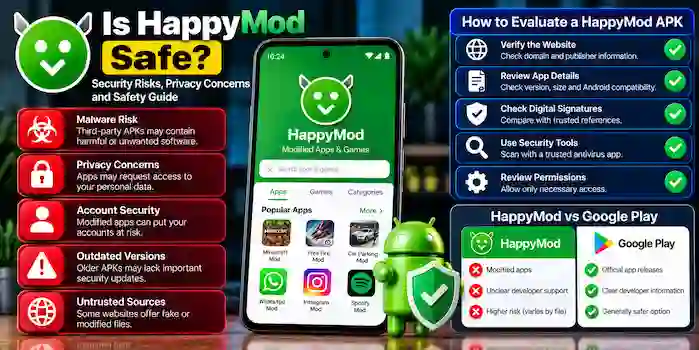
Is HappyMod safe to use? The answer depends on the specific APK, its source, and the permissions or behavior of the application. HappyMod APK old version is associated with third-party catalogs of modified Android apps and games, but not every file advertised under its name can be assumed to be authentic or secure.
Before using a third-party APK, it is important to understand the possible security risks, privacy concerns, and ways to evaluate a download. This guide explains what users should consider before trusting HappyMod or any similar platform.
What Is HappyMod?
HappyMod is a third-party platform associated with modified versions of Android applications and games. Modified apps may claim to change features, remove limitations, or provide functionality that differs from the original release.
However, modifications are not necessarily authorized by the original developer. A modified APK may also behave differently from the original application, and its security depends on the particular file.
The platform’s name, a download count, or positive user comments cannot independently prove that a file is safe.
Is HappyMod Safe to Download?
There is no universal safety guarantee for every APK associated with HappyMod. Some files may be legitimate modifications, while others may be outdated, altered, misleadingly labeled, or potentially harmful.
Several factors affect the risk:
- Source reliability: The website providing the file may not be its original publisher.
- File authenticity: An APK may have been changed or repackaged.
- Permissions: The app may request access to sensitive information or device features.
- Updates: Modified releases may not receive the original developer’s security updates.
- Compatibility: An APK may be unsuitable for your Android version or device.
For everyday applications, Google Play or the original developer’s official website is generally the preferred starting point.
Potential Security Risks of HappyMod
1. Malware and Unwanted Software
Third-party APK files can contain malicious or unwanted code. Depending on the file, this may lead to suspicious activity, intrusive advertisements, or other security problems.
A security scanner may identify known threats, but no scan can guarantee that a file is completely harmless.
2. Privacy Risks
Modified apps may request permissions that allow access to information such as contacts, location, photos, or other device data.
Before granting access, consider whether each permission is necessary for the app’s stated purpose. Be especially cautious if an unfamiliar app requests sensitive access without a clear explanation.
3. Account Security
Some modified apps may not follow the original developer’s security practices. Using them with personal accounts can expose you to account restrictions, data loss, or privacy risks.
Avoid using modified apps for banking, payments, password management, or other services involving sensitive information.
4. Outdated Versions
Older releases may lack security fixes available in newer versions. An APK that once worked correctly may become incompatible with newer Android software or online services.
Check release information and prefer a supported version from the original developer whenever possible.
5. Misleading Download Websites
Some websites use familiar app names to attract visitors but provide unrelated installers, misleading advertisements, or files with unclear origins.
Check the domain and publisher information carefully. Do not assume that a download is official merely because the page uses HappyMod branding.
How to Evaluate a HappyMod APK Before Downloading
If you are researching a third-party APK, these checks can help you make a more informed decision.
Verify the Website
Review the website’s domain, publisher information, and available contact details. Be cautious of lookalike domains, unexpected redirects, and download buttons that lead to unrelated files.
Review App Details
Check the app name, package name, version number, release date, and supported Android versions. Inconsistent or missing details make it harder to establish authenticity.
Check Digital Signatures
Where a trusted reference is available, comparing an APK’s digital signature can help determine whether it matches a known release. A signature check does not, by itself, prove that an application is safe.
Use Reputable Security Tools
A reputable security scanner may detect known malicious behavior or suspicious files. Treat its results as one part of the assessment, not as a guarantee of safety.
Review Permissions
Read the permissions requested by the app and consider whether they are relevant to its function. Do not grant unnecessary access to sensitive information.
Take Security Warnings Seriously
If Android or your security software warns that a file may be harmful, pause and investigate. If you cannot verify the file or the warning identifies a potential threat, do not install it.
Is HappyMod Safer Than Google Play?
Google Play provides an established app distribution system with developer information and security review processes. These measures do not eliminate every risk, but they offer a more dependable starting point for ordinary Android app downloads.
HappyMod is associated with modified applications, which may be changed outside the original developer’s standard release process. This can introduce additional uncertainty about authenticity, updates, compatibility, and privacy.
| Factor | HappyMod-related APKs | Google Play |
| App modifications | May include modified software | Primarily distributes developer-provided releases |
| Developer support | May be unclear for modified files | Usually provides clearer publisher information |
| Security checks | Depend on the file and available verification | Uses an established app review and security ecosystem |
| Updates | May follow a separate update process | Often supports standard app updates |
| Risk level | Varies by file and source | Not risk-free, but generally the preferred starting point |
Neither the platform name nor a store listing guarantees complete safety. The source, app behavior, and permissions still matter.
What Should You Do If You Suspect an APK Is Unsafe?
If you believe an installed app may be suspicious, avoid entering sensitive information into it. Review its permissions and use your device’s built-in security features or a reputable security tool to investigate.
If you decide to remove the app, consider whether it contains important local data and whether that data can be backed up safely. Change any passwords that may have been exposed, using a trusted device and official account-recovery options where necessary.
Keep Android and your other trusted apps updated. If the device continues to behave unusually, consult the device manufacturer’s official support guidance.
Is HappyMod Pro Safe?
The word “Pro” does not establish that a file is official, safer, or more reliable. Different websites may use the term to advertise enhanced or premium versions without providing verifiable evidence of their claims.
Evaluate the exact file, publisher, permissions, and authenticity information. Avoid paying an unfamiliar website or sharing sensitive details to access a supposedly premium APK.
Frequently Asked Questions
Is HappyMod safe to use on Android?
Safety depends on the specific APK, its source, permissions, and behavior. There is no universal guarantee that every file associated with HappyMod is safe.
Can HappyMod APKs contain malware?
Third-party APKs can contain malicious or unwanted code. Verify the source and file where possible, and do not treat security scans or user ratings as absolute guarantees.
Is HappyMod an official Google Play app?
HappyMod is associated with a third-party modified-app catalog. Verify any listing and publisher information rather than assuming that a download is an official release.
Is HappyMod safe for personal accounts?
Modified apps can introduce additional account and privacy risks. Avoid using unverified APKs for banking, payments, private messages, or accounts containing sensitive information.
Does antivirus software guarantee that an APK is safe?
No. Security tools can identify known threats, but they may not detect every harmful file or behavior.
What is the safer alternative to HappyMod?
For standard Android applications, Google Play or the original developer’s official website is generally the preferred option. These sources provide clearer publisher information and supported releases.
Conclusion
Is HappyMod safe? It cannot be answered with a universal yes or no because individual APK files, sources, and modifications can differ. Third-party modified apps may introduce additional security, privacy, compatibility, and account risks.
Before trusting any APK, verify its origin, review its permissions, check available authenticity information, and take security warnings seriously. When an app handles sensitive information, choosing an official release from a trusted distribution channel is generally the more prudent choice.
1 thought on “Is HappyMod Safe? Security Risks and Safety Guide”