
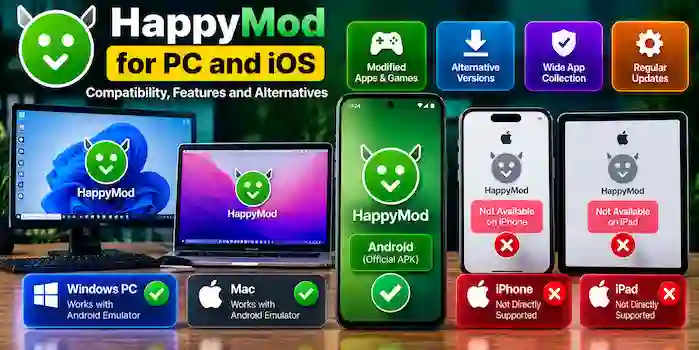
HappyMod is associated with a third-party catalog of modified Android apps and games. Users searching for HappyMod for PC and iOS often want to know whether they can access its features on a Windows computer, Mac, iPhone, or iPad.
The answer depends on the operating system and the specific app or file. Android APK files are designed for Android APK is not installing, so they do not install directly on Windows, macOS, or iOS. This guide explains platform compatibility, Android emulators, common limitations, and safer alternatives.
What Is HappyMod for PC and iOS?
HappyMod is primarily associated with Android applications and games, including modified versions of existing apps. Searches for its PC and iOS versions reflect interest in using Android-related content on other devices.
However, a website advertising a “HappyMod PC download” or “HappyMod iOS APK” does not automatically provide an official or compatible release. Check the publisher, file details, and platform requirements before trusting any download.
Is HappyMod Available for PC?
An Android APK cannot run as a normal Windows or macOS application. To use some Android apps on a computer, people may use a compatible Android environment or emulator.
Whether a particular app works depends on the emulator, operating system, app requirements, and compatibility limitations. There is no guarantee that a modified Android app will function correctly in a desktop environment.
HappyMod on Windows
Windows users may research Android emulators that can run compatible Android applications. Before using one, review the emulator’s official website, system requirements, reputation, and security practices.
Keep in mind:
- An emulator does not make every Android app compatible with Windows.
- Modified apps may crash or behave differently from their original versions.
- A file advertised as a Windows installer may be unrelated to the Android app.
- Avoid unfamiliar installers that request unnecessary access or make unrealistic claims.
Use trusted software sources and avoid installing unknown executables simply because a website labels them as a HappyMod PC version.
HappyMod on Mac
Mac compatibility depends on the computer’s hardware, operating system, and the Android environment being considered. Not every emulator supports every Mac model or operating system version.
Before installing software, check the developer’s official documentation and confirm that it supports your device. Do not assume an Android APK will run natively on macOS.
Is HappyMod Available for iPhone and iPad?
Android APK files are not compatible with iOS. An APK cannot be installed directly on an iPhone or iPad through the normal iOS app installation process.
Websites may advertise HappyMod for iOS, but users should verify whether a genuine, supported iOS application exists before trusting such claims. A page that asks you to install an unknown profile, provide account credentials, or complete unrelated verification steps deserves caution.
For iPhone and iPad apps, use Apple’s official distribution options and verify the developer’s identity.
HappyMod APK vs PC and iOS Versions
| Platform | Compatibility | Important Consideration |
| Android | APK files are designed for Android | Verify the source, version, and device requirements |
| Windows PC | Requires compatible desktop software or an Android environment for Android apps | Compatibility is not guaranteed |
| Mac | Depends on supported software and device configuration | Check official system requirements |
| iPhone | Android APKs do not install directly | Look for compatible iOS apps through official channels |
| iPad | Android APKs do not install directly | Verify iPad compatibility through official app listings |
The presence of a download page does not prove that a file is official, supported, or safe for the advertised platform.
Can You Use an Android Emulator for HappyMod?
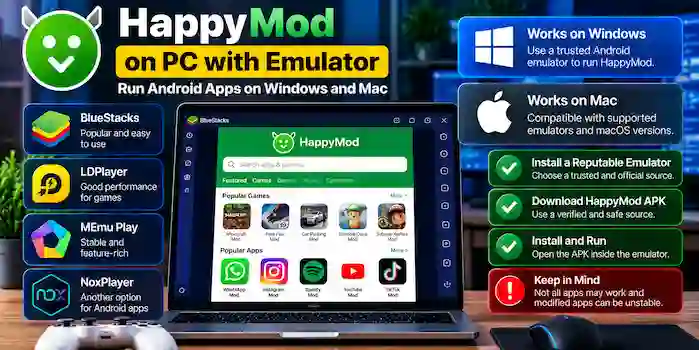
An Android emulator creates an environment for running compatible Android software on a computer. Some users explore emulators when they want to test Android apps on a larger screen.
Before choosing an emulator, consider these points:
- Check that the emulator comes from a reputable developer.
- Confirm its compatibility with your operating system and hardware.
- Review its privacy practices and permission requirements.
- Avoid loading APK files whose source or authenticity cannot be verified.
- Do not use modified apps for sensitive accounts or financial activities.
An emulator does not remove the security risks associated with a modified APK. A suspicious application may still access information available within its environment or behave in unexpected ways.
Why Do HappyMod PC Downloads Sometimes Fail?
A file advertised as a PC version may fail because it is intended for Android, is incompatible with the computer, or is an unverified installer.
Other possible reasons include:
- Unsupported operating system requirements.
- Incompatible emulator software.
- Incomplete or damaged downloads.
- Missing system components.
- Security software identifying a potential threat.
- Misleading download pages offering unrelated files.
Check the file type and publisher information before opening it. If a supposed PC installer cannot be verified, avoid running it.
Is HappyMod for PC or iOS Safe?
Safety depends on the specific file, its source, and how it behaves. A familiar product name or attractive download page is not proof of authenticity.
For third-party software, review the publisher, available digital signature information, permissions, and security warnings. Reputable security tools can help identify known threats, but no scan guarantees that a file is harmless.
Avoid websites that request your Apple ID password, Google account password, payment details, or verification codes to provide an unverified download. Do not disable essential security protections to run an unknown installer.
Alternatives for PC and iOS Users
If you want apps on a particular device, choose options designed for that platform.
For Windows and Mac
Use the original developer’s desktop application when one is available. For Android app testing, consider a reputable Android development or emulation environment and verify that it supports your operating system.
For iPhone and iPad
Search Apple’s official app distribution channels for the original application or a compatible alternative. Check the developer, app description, privacy information, and supported device requirements.
For Android
Google Play and the original developer’s website are generally the preferred starting points for standard app downloads. These sources can provide clearer publisher information and supported updates than an unknown third-party download page.
Frequently Asked Questions
Can I download HappyMod for PC?
Some websites may advertise a PC version, but you should verify the publisher and file before downloading. Android APK files do not run as standard Windows or macOS applications.
Can I install HappyMod on an iPhone?
An Android APK cannot be installed directly on an iPhone. Check Apple’s official distribution options for compatible applications and verify any claims about an iOS release.
Does HappyMod work with Android emulators?
Compatibility depends on the emulator, operating system, and particular app. Modified APKs may not work correctly, even in an otherwise compatible Android environment.
Is a HappyMod PC installer the same as an APK?
No. An APK is an Android application package, while a Windows installer uses a different format. A download advertised as a PC version should be verified independently.
Are HappyMod PC and iOS downloads safe?
No file should be considered safe simply because of its name. Verify the source, publisher, file details, and security warnings before deciding whether to trust it.
Conclusion
HappyMod is primarily associated with modified Android apps and games, so using it on a computer or Apple device involves different compatibility considerations. Android APK files do not install directly on Windows, macOS, iOS, or iPadOS, and compatibility through an emulator is not guaranteed.
Before downloading anything advertised as HappyMod for PC and iOS, verify the source and platform requirements. For everyday applications, prefer official distribution channels and software supported by the original developer.